Roon: my home music server
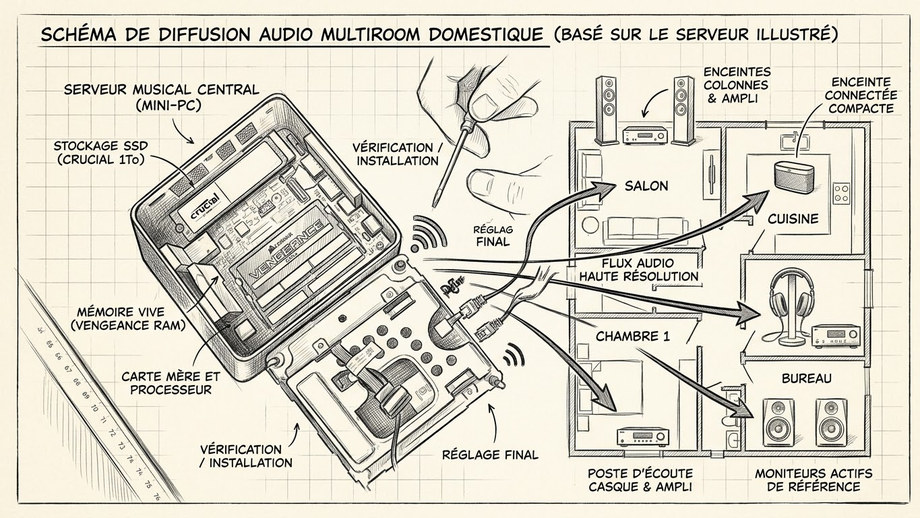 Roon server on a mini-PC, and the multiroom system it feeds. (sketch annotated in French)
My Roon music server has now been quietly running in a corner for 4 years, with no real issues beyond the occasional update. A good excuse to finally write the article I started 4 years ago and never finished: what Roon actually is, how I built the server, how it works day to day, and how I turned my very first amplifier — bought 44 years ago — into a modern network listening point for next to nothing.
What Roon does
Roon is music server software: it manages a library of audio files (typically your CDs converted to digital files) and streams them throughout the house — to an iPhone, a PC, a Mac, or a compatible dedicated device. But it does a lot more than that: if you have a subscription to a compatible streaming service (Qobuz, in my case), its entire catalogue appears in the same interface as your personal library, with no need to juggle between apps. Roon also integrates internet radio, and above all a feature I find particularly well done, Roon Radio: once your queue runs out, it automatically continues with tracks similar to what you were just listening to, fetching them online.
Architecture-wise, the principle is simple: on your local network (the LAN, behind the router that separates the internet feed from your home network), you install the music server — a dedicated small PC — where the files ripped from your CDs are stored. This server manages the library and then streams it to every compatible device in the house.
The hardware: a mini-PC, two drives, two jobs
I went with an Intel NUC, a very compact mini-PC. Mine is connected via Ethernet only — WiFi would work too, but a wired connection stays more stable and faster, so I prefer it.
Inside, there are two things to distinguish:
- The system drive, running the OS and the Roon software (in its ROCK form, Roon Optimized Core Kit). This drive gets rewritten on every software update, so there’s no point going big — a 64GB NVMe M.2 SSD is plenty (harder to find today than 128GB, but there’s no benefit to going larger here).
- The music drive, a second SSD (SATA, in my case) dedicated purely to storing audio files. This one you want to size generously: between CDs already converted and future ones, plus any high-resolution purchases from Qobuz or other platforms, budget for 500GB, or even 1TB or more depending on the size of your collection.
On the RAM side, 16GB of DDR4 (a single module) is more than enough.
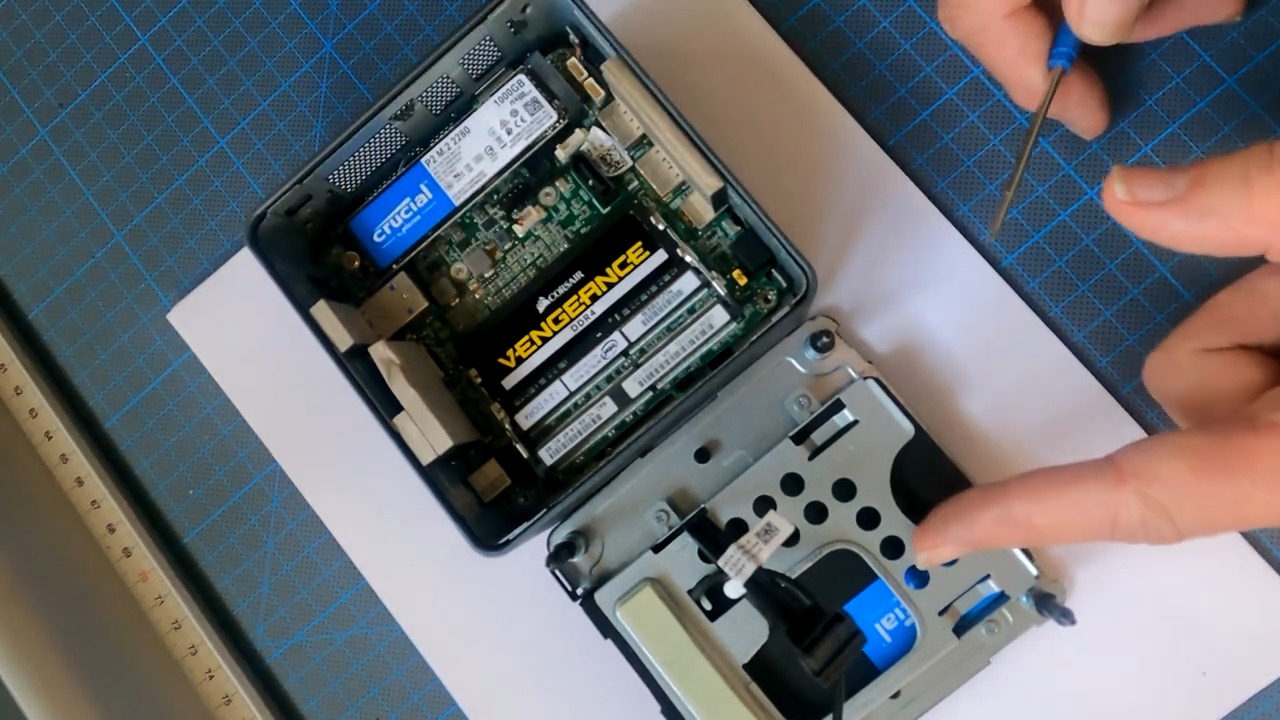
The NUC opened up: the NVMe system drive, the memory module, and the SATA music drive sitting in the lid.
Installation: an appliance-style setup
The installation stays fairly simple. You flash a USB key with the ROCK system image, temporarily connect a keyboard, a monitor (HDMI), and the Ethernet cable, then boot. A quick trip into the BIOS (F2 key) lets you check everything is configured correctly before booting from the USB key.
The installer detects the drives present and asks which one to install the system on: it’s the small NVMe drive you want, not the music drive — its entire content gets wiped, so it’s best to start with blank drives. The install is quick, the system then reboots from the internal drive and displays on screen the one piece of information you’ll need: its IP address on the local network.
From there, no more keyboard or monitor needed: everything is managed from a browser (just for basic setup, initialising the music drive, an occasional reboot) or, day to day, from the Roon app itself — available on Mac, Windows, iOS and Android, with exactly the same interface everywhere, so you’re never lost switching devices.
Using Roon: library, streaming, radio and zones
Once set up, you get your library organised by artist, album, track or composer, with the option to browse by genre. Thanks to my Qobuz subscription, I can also listen to anything in their catalogue directly from the same interface — handy not having to switch apps between my own music and streaming. Roon also offers access to internet radio stations (Radio Paradise, Dutch jazz stations, etc.), and above all the Roon Radio feature already mentioned, which automatically extends listening with tracks in the same vein. You can create as many playlists as you like, tag tracks, and set up multiple user profiles — one for me, one for my wife.
The “Audio” section of the settings is where you declare the devices Roon will stream to — what Roon calls zones. Each device needs to run a small (free) companion piece of software to be recognised. At home, I have several zones: a multi-zone NAD network streamer feeding ceiling-mounted speakers in one room and in the kitchen, and a Power Node streamer feeding a pair of Focal speakers on my desk. There’s also a mobile app, Roon ARC, which lets you listen to your library remotely from anywhere over the internet, in high resolution if network conditions allow.
Turning an old amplifier into a network listening point
My favourite find in all this: my very first amplifier, a Luxman L31 bought 44 years ago in Malo-les-Bains (Dunkirk), which I’ve never been able to bring myself to part with. To give it a new purpose, I added a Raspberry Pi (around €40) fitted with a small USB sound card (a Digi/Fiio-type card, around €60), connected via RCA to the amp’s input — exactly like plugging in a turntable. By installing the Roon Bridge software on the Pi, the whole setup behaves like a built-in network streamer: pretty much any old amplifier with RCA inputs can join a Roon network for next to nothing this way.
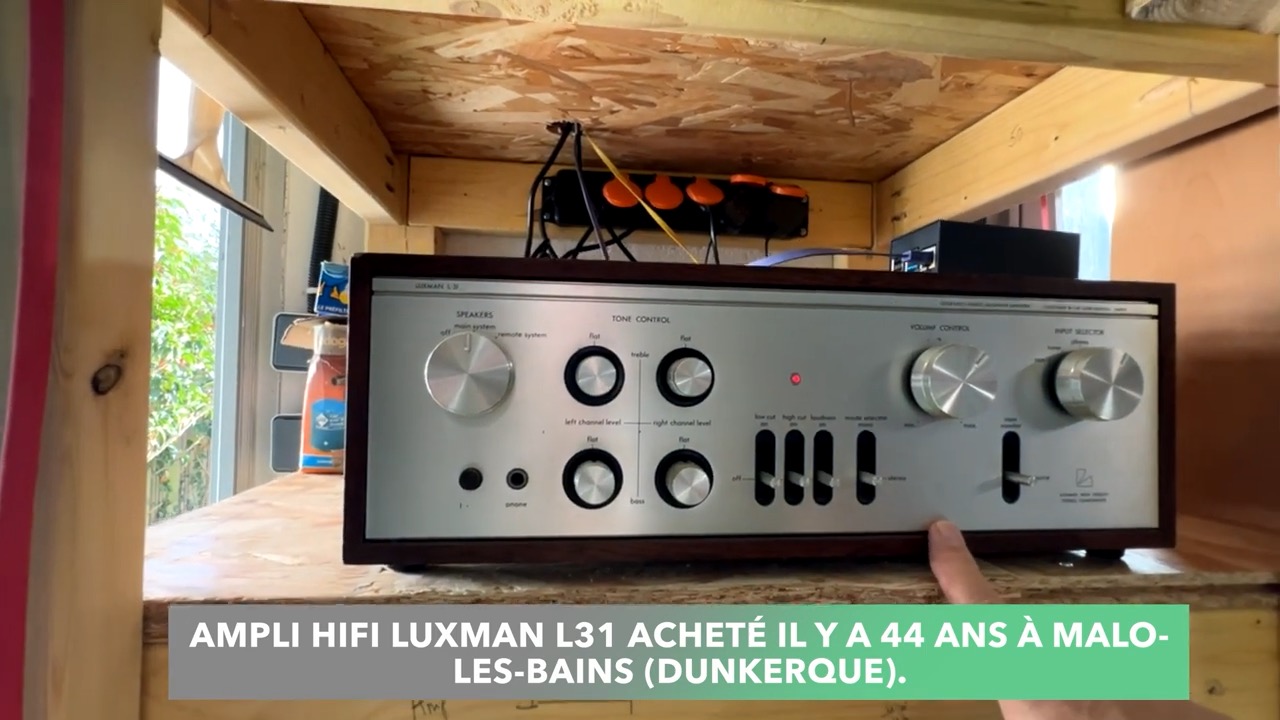 Luxman L31 hi-fi amplifier bought 44 years ago in Malo-les-Bains (Dunkirk), with the Raspberry Pi added on top.
Ripping CDs losslessly: encoding and AccurateRip verification
Before enjoying any of this, there’s of course the longest step to get through: converting your CDs (around 500 in my case) into digital files. The key point is choosing a lossless format — FLAC or ALAC — rather than MP3, to stay as close as possible to the original audio quality (PCM format, 16-bit / 44.1kHz).
Two main pieces of software for this: dBpoweramp (paid, Windows and Mac, the one I’d recommend for its features) and fre:ac (free, Windows and Mac, the one I’ve used the most). Two things to pay close attention to when ripping:
- Metadata retrieval: title, artist, composer, date, cover art. dBpoweramp automatically queries several online databases (AccurateRip, Discogs, MusicBrainz, freedb…) and generally finds all of it within seconds.
- AccurateRip verification: this is the most important part. Each ripped track generates a fingerprint (checksum) that gets compared against a worldwide database fed by everyone else who has ripped the same CD. If several people got exactly the same fingerprint, you get near-statistical certainty that the conversion is bit-perfect — shown as “AR” followed by a number (for example AR12: twelve other people found the same result). If the CD isn’t in the database at all, the software just shows “secure” (no read errors detected, but no external confirmation). A scratched or dirty disc, or a drive with a speed issue, can introduce read errors — AccurateRip verification lets you catch that and re-rip if needed.
Budget roughly 2 to 3 minutes per CD — enough to turn converting a large collection into a multi-day project. It’s worth taking the time to properly understand the tool at the start rather than rushing in: the quality of this work underpins everything else.
After 4 years
A server that’s run without issues for 4 years, a library of several hundred CDs finally properly accessible (instead of gathering dust in an attic), and the ability to bring old audio gear back to life for a handful of euros. For anyone with a CD collection and the wish to make it genuinely usable day to day, Roon remains, in my view, one of the most polished solutions on the market.
What happened next
We have since sold the house, and the Roon server did not stay with it: I had to decommission it.
Two reasons. The first is practical — Roon runs on a paid subscription tied to my account. The second matters more, and it is the one that settles the question: the music library is mine. Those files were created from my own CDs, and they only exist legitimately for as long as I own the discs they came from. Leaving them behind while taking the CDs with me would mean handing over copies, which is out of the question. The server and its library were therefore removed from the installation.
The rest of the hardware stayed. The NAD network streamer and the Bluesound Power Node have no need of Roon to work: they are driven from the Bluesound app and connect directly to Spotify, Qobuz or Tidal. The new owner gets listening zones that work perfectly well, simply without the Roon layer on top.
The Luxman, though, came with us. I took it down along with its Raspberry Pi and put it into storage, waiting to find it a new use. I don’t think I’ll ever part with it: forty-four years on, there are too many memories attached to that amplifier.